

What is SEO?
When you write text for SEO, it’s important to understand what SEO is.
SEO stands for “Search Engine Optimization.” It is the process of optimizing your website’s text and metadata in order for search engines like Google to rank the value of the content on a page of your website.
Important areas of your page content to focus on for SEO.
- Page Title
- The first sentence in the first paragraph of the page
- Headers and Sub-headers
- Image Alt Text & Description (hidden text seo)
- Word Count: 600 words or more
- Page Description (what shows in previews of the page on social media
- Add a Table of Contents
How do we write text for SEO?
Start with the Page Title
When optimizing your website for search engines, it’s crucial to pay attention to the SEO elements, starting with your page title.
Your page title should incorporate your targeted keyword and be coded as an H1 tag (header 1) for optimal visibility and relevance.
When crafting your content, whether it’s for a blog post, product page, or any other section of your website, it’s not enough to simply increase the font size and apply bold formatting. To ensure that your content is correctly interpreted by search engine crawlers and displayed effectively on your website, it’s essential to use the appropriate header styles in text editors.
This means applying the Header Style feature rather than manually adjusting the text appearance. While it might seem like a small detail, proper styling ensures that your content retains its structural integrity when transferred to your website’s backend.
Without this attention to detail, the intended hierarchy of headers, from H1 to H6, may not be preserved, potentially impacting your site’s SEO performance and overall user experience.
So, remember, when working on your website text, always prioritize proper formatting and styling to maximize its SEO potential and enhance the readability and navigability of your web pages.

First Things First
Now that you have the keyword in your page title and your page is showing that title as an H1 tag, we need to include your keyword in the very first sentence of your first paragraph. This can be done in whatever way it sounds natural. You might start with the keyword, include it in the middle of the first sentence, or end the first sentence with the keyword.
Here are examples using this page’s “text for SEO” as the keyword:
- When you write text for SEO, it’s good to understand what SEO is.
- To write text for SEO, you’ll first start with the Page Title
- Your page’s SEO works better when you write text for SEO as your goal.
Include headers and sub-headers in your Text for SEO
Incorporating headers and sub-headers into your webpage structure is not only beneficial for SEO purposes but also crucial for enhancing the overall readability and user experience.
By strategically implementing headers, such as H1 (only for page title), H2, and H3 tags, you signal to search engines like Google that your page contains valuable and organized content, thereby increasing its chances of ranking higher in search results.
These headers serve as signposts, guiding both search engine crawlers and site visitors through the hierarchy of information on your page.
Moreover, they play a vital role in breaking down the content into digestible chunks, making it easier for readers to navigate and locate the information they are interested in.
This ability to “scan” the page quickly for relevant details improves user engagement and satisfaction. When using subheaders, such as H2 and H3 tags, it’s essential to incorporate relevant keywords wherever possible.
This not only reinforces the semantic relevance of your content but also helps search engines better understand the context and significance of each section.
By aligning your header structure with your target keywords, you create a more cohesive and SEO-friendly page that resonates with both search algorithms and human readers alike.
Therefore, when crafting your webpage content, always remember to leverage headers and subheaders effectively to optimize for both SEO and user experience.
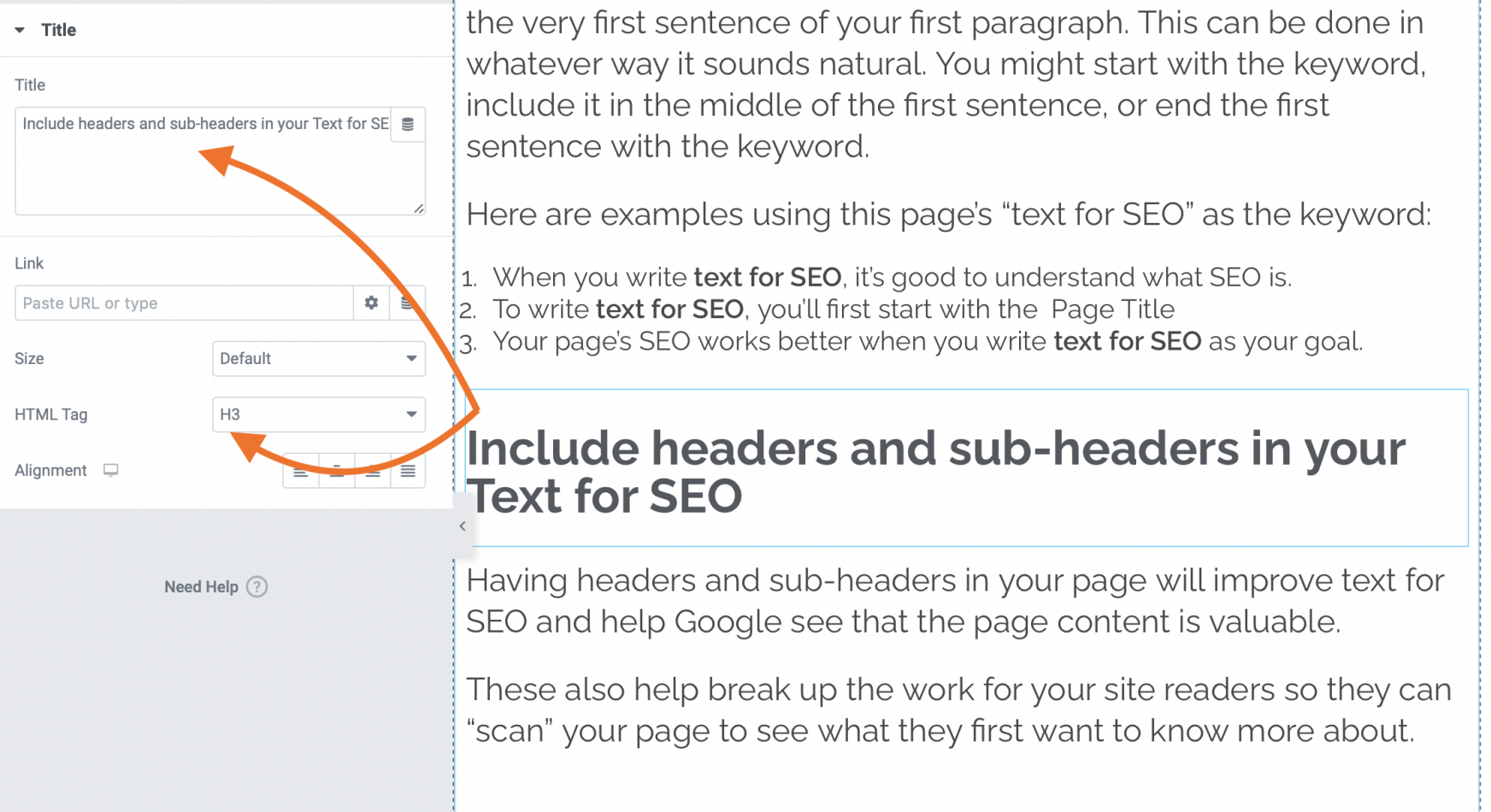
Image Alt Text, Description, and Caption
This is considered “hidden text SEO” because you can’t actually see it in the content of the page.
- Image filename
- Alt Text
- Image Title
- Caption
- Description
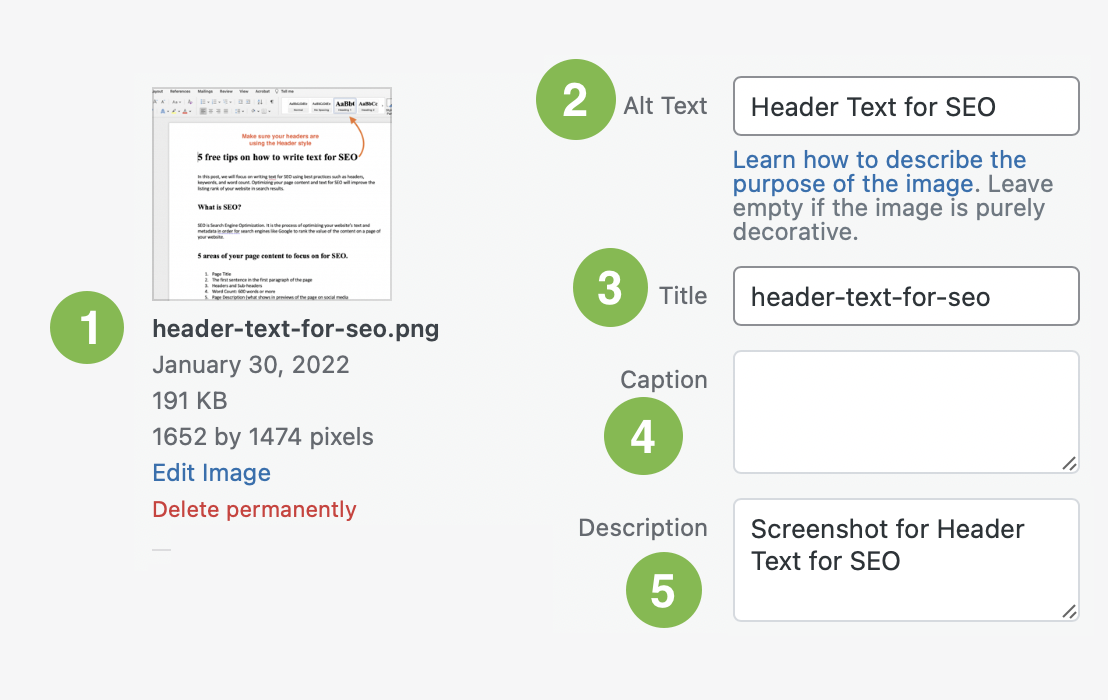
When adding images to your page, be sure to include your keyword into the Alt Text (2) and the Description (5) of that image.
This will help with website content relevance. The alt text is what shows if the image doesn’t load, and for screen readers. And the Description should explain what the image is… such as a screenshot, a dog, or a chart about the quality of Star Trek shows.
Most “About” pages include the organization’s teams and bio photos. Be sure to include the person’s name in the Alt Text and a description such as “Photo of Jane Doe, CEO of Everywhere.”
- Learn about image file types and which to use for websites, and what is the difference between a JPG and a PNG.
- Learn how to add Alt Text in your images in WordPress on WP Engine’s documents.
If your image includes a caption (text under-and-connected-to), be sure that it’s related to the file name of the image, the Alt Text, and the Description.
Word Count of 600 words or more
Ensuring that your webpage’s text content meets a minimum word count requirement is a fundamental aspect of writing for SEO purposes.
Aim for a word count of 1200 words or more to provide sufficient depth and breadth of information to both users and search engines. However, achieving this word count should not sacrifice readability or user experience. Therefore, it’s essential to follow certain guidelines to optimize the length and structure of your content effectively.
Extra Tips About Page Content-Length
Keep your sentences short and easy to read. Don’t write extremely long sentences.
Firstly, keep your sentences concise and straightforward, avoiding excessively long or convoluted constructions that can confuse readers and dilute your message.
We know you are smart but stick with commonly used words and phrases in your explanation of things.
While demonstrating your expertise is important, prioritize clarity by using commonly understood words and phrases, rather than overly technical jargon or obscure terminology. This ensures that your content remains accessible and engaging to a wider audience.
Keep paragraphs no more than 4 or 5 sentences long. Adding some line breaks will help your reader’s eyes.
Additionally, break up your content into manageable chunks by limiting paragraph length to no more than 4 or 5 sentences. Utilize line breaks and white space strategically to create visual breathing room, making it easier for readers to digest the information and navigate through your content.
By adhering to these best practices, you can strike the right balance between quantity and quality in your webpage’s text content, maximizing its SEO potential while enhancing the overall user experience.
Page Description
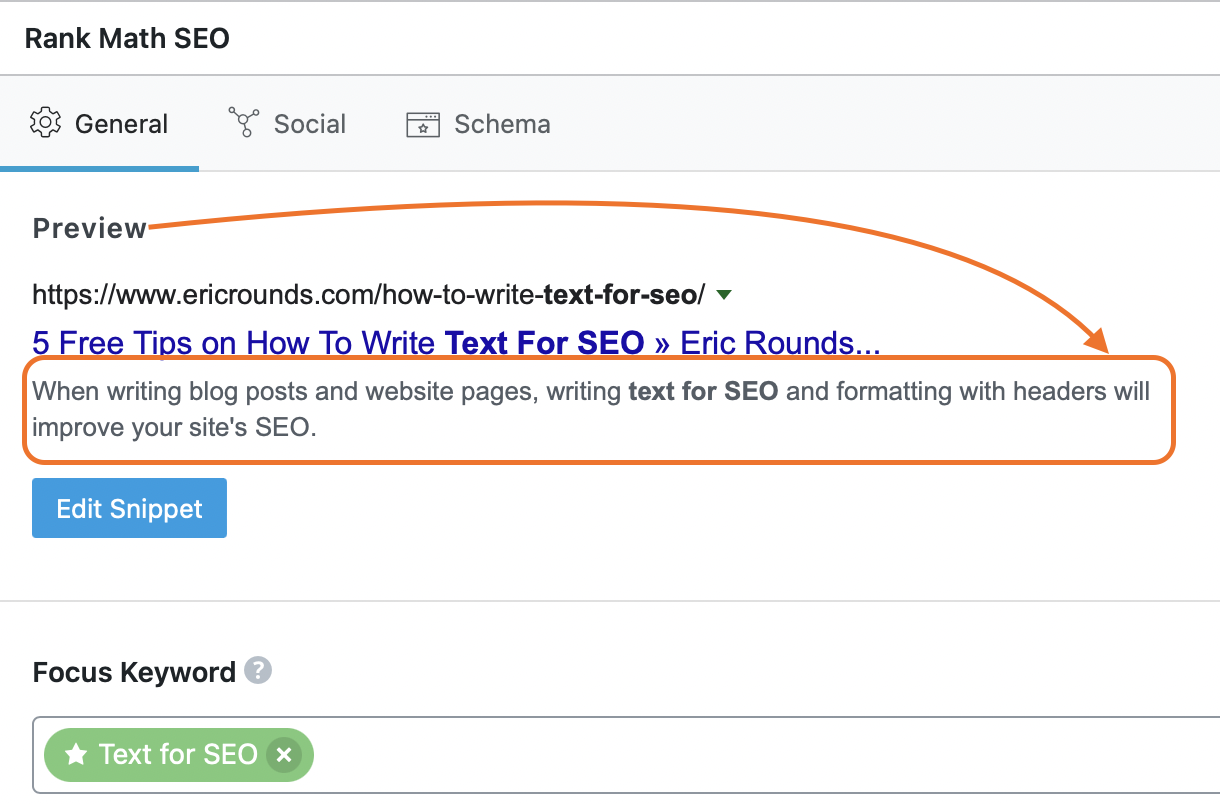
Your page description shows in search results and social media post previews and also contributes to the value of your text for SEO on a page-by-page basis.
By default, your “excerpt text” is used as the preview text. Tools like Rank Math allow customizing this.
Crafting an effective page description is paramount for enhancing both the visibility and SEO value of your website’s pages.
This snippet of text serves as a teaser for users in search engine results, providing a concise preview of the page’s content and enticing them to click through.
Moreover, the page description plays a significant role in signaling to search engines the relevance and authority of your page within its respective topic or niche.
Therefore, it’s crucial to optimize this aspect of your website’s metadata on a page-by-page basis. By default, search engines often use the “excerpt text” or a snippet from the page’s content as the preview text in search results.
However, leveraging advanced SEO tools like Rank Math offers the flexibility to customize and fine-tune this preview text according to your specific optimization goals.
This customization capability empowers website owners and marketers to craft compelling and persuasive page descriptions that not only capture users’ attention but also align closely with their search intent.
Whether it’s highlighting unique selling points, addressing common pain points, or incorporating targeted keywords, optimizing your page descriptions can significantly impact your website’s click-through rates and overall search performance.
Therefore, take full advantage of these customization options to elevate the effectiveness of your page descriptions and maximize their contribution to your website’s SEO success.
Add a "Table of Contents"
Much like the convenience of your text editor providing an outline of your document through the use of text headers, incorporating similar functionality into your website pages or blog posts can greatly enhance user experience and SEO performance.
This is a Table of Contents like what you see on his page. WordPress Elementor offers a widget to add to your pages.
This can be achieved by utilizing H2, H3, or H4 tags to create sub-dividers within your page content, effectively organizing and structuring the information for easy navigation and comprehension.
By segmenting your text into distinct sections, you not only facilitate readability but also alleviate the potential monotony of consuming lengthy blocks of content. This deliberate structuring encourages users to engage with your content more effectively, improving both retention and satisfaction.
It’s important to emphasize that the content you’re creating for your website serves a specific purpose, whether it’s providing valuable insights, practical guidance, or entertaining narratives.
This distinction is crucial, especially in the realm of SEO, where relevance and quality are paramount. While it’s tempting to indulge in creative endeavors like fan-fiction, maintaining a focus on producing valuable and informative content is key to attracting and retaining your target audience.
Additionally, incorporating a table of contents on your web pages can further enhance their appeal to both users and search engines. Google, in particular, favors pages that offer clear navigational aids like a table of contents, as it improves the overall accessibility and organization of the content.
By leveraging these best practices in structuring your website text, you not only enhance user experience but also bolster your SEO efforts, ultimately driving greater visibility and engagement for your online presence.
How to apply the Header Style (making your text bold and larger does not make it an actual “header”)
Your text editor like Pages or Google Docs offers Header specific styling options. Be sure to use our text editor’s Styling option to apply the Header style where needed. Use the links below to “See How” for your text editor.More About Text
Let’s Talk About Text
SEO (Search Engine Optimization) is a complex and required aspect of a website. It tells the search engine like Google, what your page, and your whole website, are about. The higher quality and accurate content, the higher it is ranked towards the top of the search results.
Be sure that you write your blog posts and website content with the following in mind:
Power Word
A Power Word is something Intriguing, Emotional, or Sensory… like FREE, Exciting, or Mouthwatering Pizza. By adding the appropriate power word in your page title, not only will it rank higher, but it will also receive more clicks.
Page URL & Page Title
For example, if your Title is “5 Free Tips on How To Write Text For SEO” then the like to it should match or at least include the keyword(s) … website.com/how-to-write-text-for-seo/
Headers Contain Keywords
The H1 (Header One) is almost always the title of the page, and should be used only once on a page. The H2 and H3 are described above. Always include your keyword or phrase in your headers. If you need help writing quality headlines, read Your Headlines Suck, and Here’s Why.
Keywords in Body Text
Be sure that when you use your keywords, you include them with purpose. Stuffing a page with keywords is so 1997. Search Engines are smarter now.
2000 Words+
It’s not as difficult to write a blog post or web page with 1200 words or more. Simply create the outline of what is important, what is needed to share with your reader… and then fill in with conversational and relevant text so that it reads easily. If you need more text, include what will happen if the opposite is done, or how what you wrote has helped you or your clients.
Include links
The value of your page is how it connects to other pages. Ask your associates to link to your page, and offer a way for you to link to theirs in your post. For example, here is an article exactly that talks about Why Links Are Important for SEO. See how easy that was?
Include links to other pages on your website. Links in text content are different than the links in your menu navigation. Linking to your own content also helps to have “sticky” site visitors. For example, if you need and want help with your site content, here’s an article to help you with that!
Key Words in Excerpt
Your page excerpt is also the preview you see on social media links like Facebook. It’s also the preview you will see on blog landing pages. Consider it like the synopsis and essence of what your page is about.
Accessibility for Websites
Google has started to push further into site content relevance with mobile-friendly measurements, and accessibility. Make sure your website is accessible for all site visitors with this convenient checklist to verify the accessibility requirements for your website. Let’s make your site ADA compliant!